

 MCP
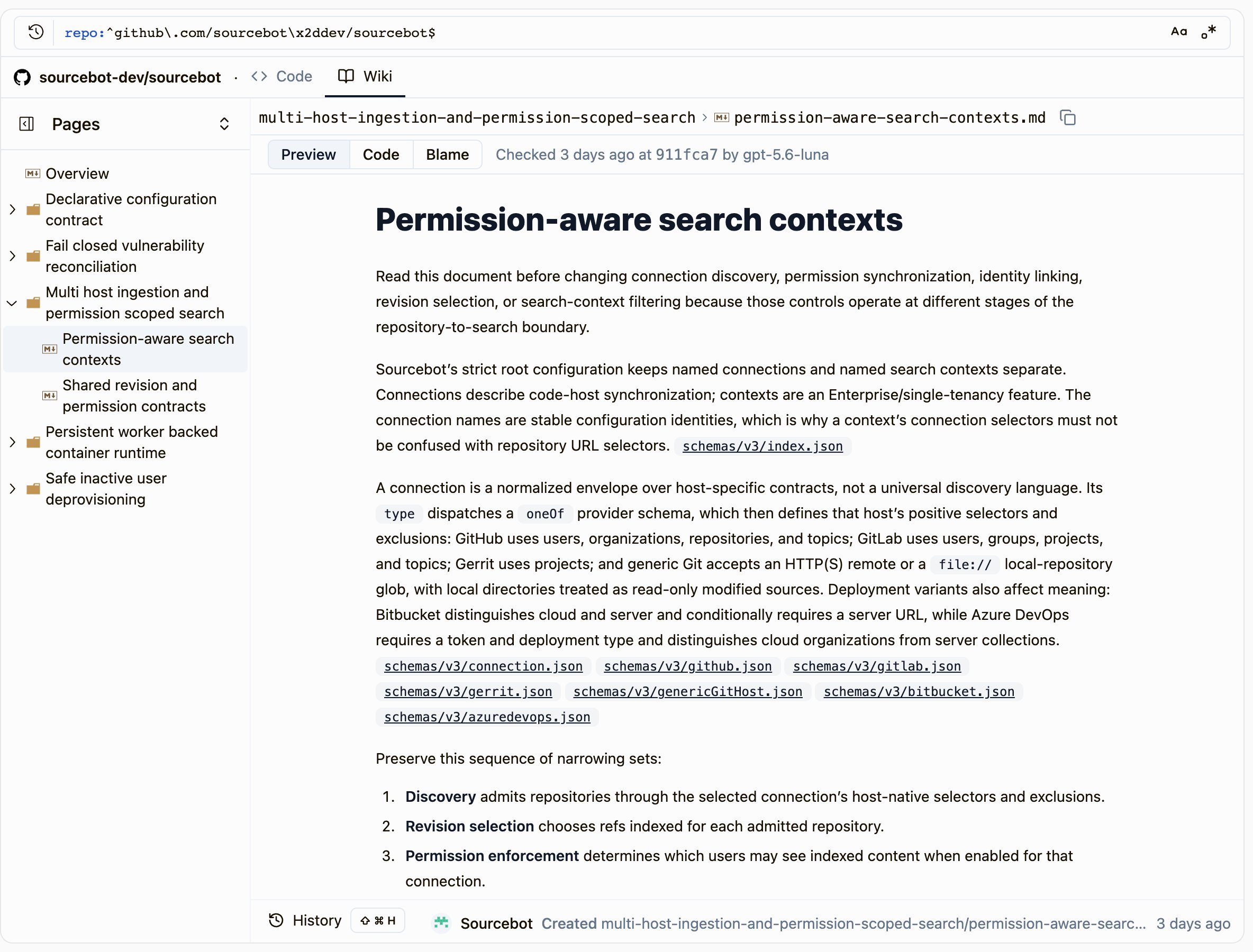
Reading the wiki
When your license includes Wiki, every repository has a Wiki tab next to its Code tab. The wiki opens on itsREADME.md overview and lists every document by system. A citation of the repository’s own files links to the cited lines in its Code tab.
If a repository doesn’t have a wiki yet, its Wiki tab says why. Owners get a button that takes them to the right place in Settings → Wiki.
If your license doesn’t include Wiki, only repositories that already have a wiki show the Wiki tab.
Each document shows when a scan last checked it against the code, the commit it checked, and which model checked it. A check doesn’t always change the document.
As in the Code tab, switch a document between Preview, Code and Blame, and open History at the bottom of the page to see when and how it changed.
A repository’s wiki is visible to exactly the people who can see the repository.
Linking from a developer portal
Each repository’s wiki has a stable address, so you can link to it from other tools, such as Backstage or another developer portal. Link to the wiki’s home page rather than a single document. A document’s address follows its path, and later scans can merge or remove documents. Not every repository has a wiki. To show a link only when there’s one, callGET /api/wiki with the repository’s name, authenticated with an API key:
Show the link when
exists is true, and point it at url.
- The API key acts as the user who created it. A repository that user can’t see returns
404, the same as a repository that doesn’t exist. Use a key from an account that can see every repository your portal lists. - Each request counts toward your API rate limit.
How agents use it
Generated docs appear as aknowledge-base/ folder inside each repository in search and agent tools. The folder’s README.md gives you an overview and an index of the generated documents. In the web app, the docs appear in the repository’s Wiki tab instead of its file tree.
Sourcebot indexes the docs like any other repository. Agents find them with the existing grep, read_file, and list_tree tools in Ask Sourcebot and MCP.
The docs cite a repository and file together, so an agent can verify a claim with one read_file call. Citations use @file:{repo::path} syntax.
Searches scoped to a repository include its generated docs. When a search covers both knowledge documents and ordinary code, knowledge documents receive a large ranking boost so they appear first.
This is a strong preference, not a strict guarantee. The streaming web search UI displays results as they arrive from the search backend, so a knowledge document from a slower shard can appear after earlier code results. Non-streaming search surfaces (such as agent tools and the API) sort all results before returning, so knowledge documents rank first reliably.
Enabling Wiki
Wiki requires all of the following:- Your license includes the
knowledge-baseentitlement. - Your config file’s top-level
modelsarray contains at least one entry. - An owner turns on Enabled on Settings → Wiki.
- An owner then chooses repositories with Edit repositories on the same page.
knowledge-base entitlement, generated docs stay searchable, but Sourcebot stops updating them.
Choosing repositories
Owners choose repositories on Settings → Wiki. The page also shows the status of each repository’s scans.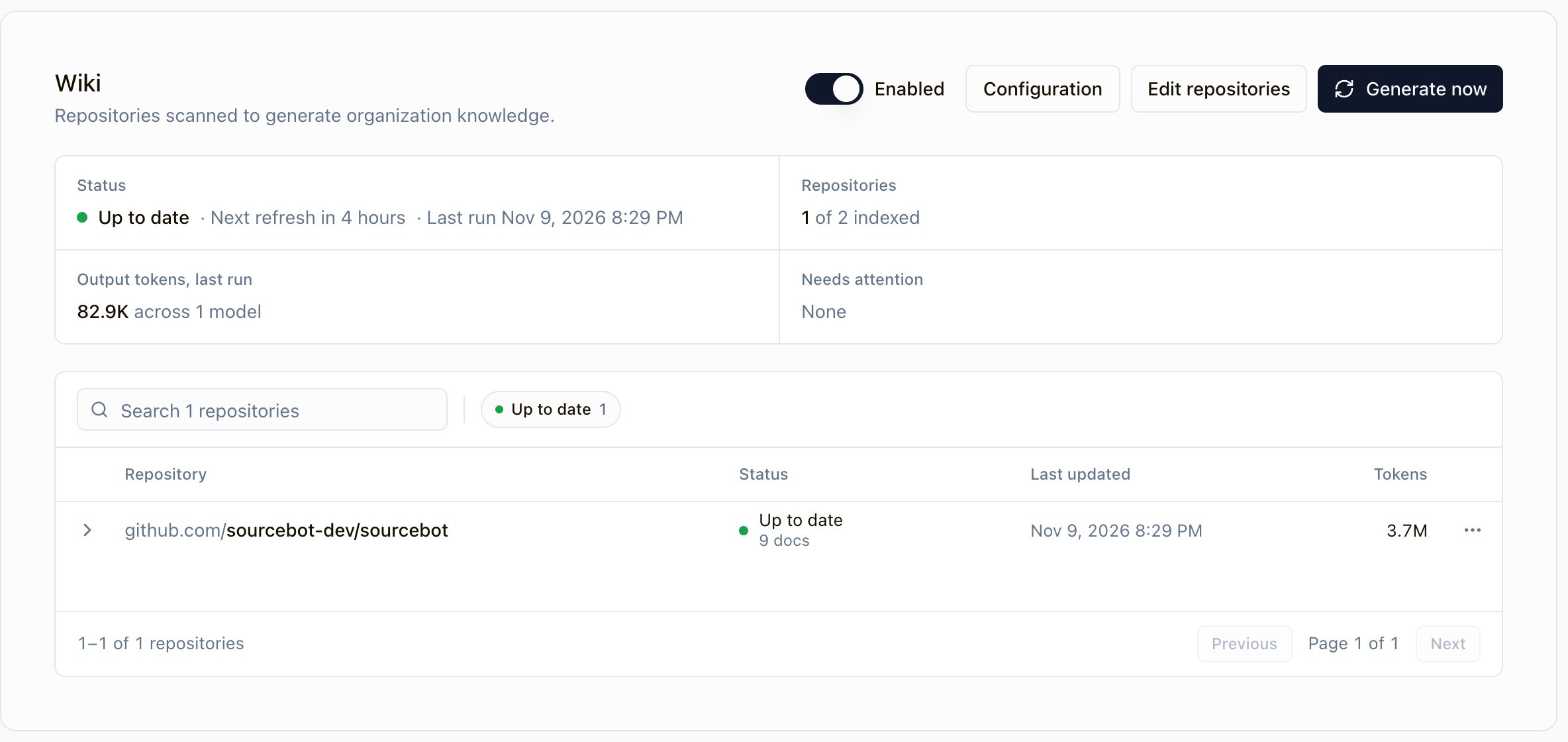
Expand a repository to see the current or latest run, its token usage by model, and how much of the Token budget per scan it used. Select View logs to see the run’s logs.
If a repository already has a real root entry named
knowledge-base, the repository shows a warning and generation pauses for it. While the conflict stands, the repository’s Wiki tab says its wiki couldn’t be written, and GET /api/wiki reports no wiki. Sourcebot keeps the generated docs. Rename or remove the entry, then select Generate now to bring the wiki back.
To remove a repository’s wiki, select Remove wiki from the repository’s menu. Sourcebot deletes the repository’s knowledge repository, clone, and shards, and stops generating its wiki. To bring the wiki back, select the repository again in Edit repositories.
Configuration
Owners tune generation on Settings → Wiki → Configuration. Sourcebot stores these settings in its database, so you don’t edit your config file to change them.
Models and their credentials stay in your config file. The configuration page lists the entries in your top-level
models array.
The settings.maxKnowledgeScanJobConcurrency config setting controls how many repositories scan concurrently. Its default is 1. Increasing it multiplies your possible per-job spend by the number of concurrent jobs.
Per-stage models and reasoning effort
Generation runs in four stages, described in How docs are generated. You can choose a model and reasoning effort for each one:- Discovery runs territory scouts and the system reconciler.
- Survey surveys each canonical system and merges the work list.
- Document generation writes each knowledge document.
- Overview writes the README overview.
models array, the same default that Ask Sourcebot uses. To change that default, reorder your models array.
Discovery and Overview use the Survey model unless you choose a model for them. Document generation does not inherit a model from another stage.
Each stage has its own reasoning effort. No stage inherits effort from another. A stage without a chosen effort works as follows:
- If its model supports reasoning effort, the stage uses
high. - If its model is OpenAI-compatible, the stage shows Model default and Sourcebot sends no effort. Some OpenAI-compatible servers reject an effort for models that do not reason. Choose an effort to send one, or choose Model default to stop sending it.
- If its model does not support reasoning effort, the stage shows Not supported.
reasoningEffort or thinkingBudget, during scans. Ask Sourcebot still uses those settings.
Providers map effort values as follows:
Sourcebot resolves all stage settings before it starts the scan. A missing model, unsupported provider, or model setup failure stops the whole scan before it spends tokens.
Anthropic models without adaptive thinking log a warning and run without the effort. They keep their existing thinking behavior.
Usage rows appear separately for each model. Each generated document records the model that wrote it.
README.md records the readme model.
Scan modes
The Delta mode is the default. It updates only documents whose cited files changed. It falls back to a full scan for a large diff, missing history, or a last full scan older than 7 days. The Full mode re-verifies every document during each scan cycle. A repository’s first scan is always a full scan. If a full scan fails after its retries, scheduled delta scans back off before they try a full scan again:- The wait starts at 1 day and doubles with each further failed full scan, up to 7 days.
- During the wait, a scan that is only due for its periodic full scan runs as a delta scan instead, as long as the repository has a previous successful scan.
- A scan that needs a full scan for any other reason is skipped until the wait ends. The scan status keeps showing the last scan that ran.
- A successful full scan ends the backoff. Generate now and the Full mode always run as requested.
Scheduling and cost
Scheduled scans refresh according to the Refresh interval setting. The default interval is 24 hours. Sourcebot uses the citation index to skip repositories with no relevant changes. Every job records input, output, cache-read, and cache-write tokens for each model. You can see this usage on Settings → Wiki. The Token budget per scan setting bounds the tokens that your job newly processes. Prompt-cache reads do not count against this budget. Sourcebot caches the agent conversation with supported providers so your long scans re-read context from cache. If your scan exhausts its budget, encounters a structural failure, or an agent’s response is cut off at the model’s output token limit, it fails immediately without a retry. Your scan model calls use a 45 minute transport timeout. Reconciliation and other single-step generations can legitimately exceed typical HTTP header timeouts.How docs are generated
A background, offline scan reads each selected repository with an LLM. It writes Markdown documents into a managed knowledge repository for that repository. Sourcebot indexes the knowledge repository and serves its documents as the repository’s wiki. A full scan organizes documentation around discovered systems:- Sourcebot carves the repository’s pinned tree into deterministic, weight-budgeted territories.
- Territory scouts explore in parallel and identify a few load-bearing systems with code evidence.
- A system reconciler fuses duplicates, folds satellite candidates into parent systems, and rejects low-value groupings.
- Per-system surveyors prioritize architectural invariants, cross-cutting flows, tricky contracts, and why-decisions.
- A taxonomist merge agent curates the final work list. Document agents write it, then the README fan-in builds the overview.
finish_doc successfully for its own path. If it stops without finishing, Sourcebot nudges it to submit before treating that item as failed. Other document items continue running when one item fails.
A delta scan skips territory scouting and reconciliation. It groups affected documents by their existing system folder and runs only the relevant surveyors. Changed repository files that no document cites are sent to every active delta surveyor for adjudication.
Document naming contract
Every newly planned document uses exactlysystem-slug/concept-slug.md. Both segments use lowercase kebab-case with at most 64 characters. The folder names the canonical system, and the file names a specific concept.
The concept name cannot repeat its system folder. Sourcebot also refuses these generic concept names after ignoring case and punctuation: overview, readme, index, doc, docs, documentation, about, misc, general, summary, notes, info, main, other, todo, claude, and agents.
Existing documents at legacy paths remain editable, finishable, and deletable. The stricter naming contract applies only when surveyors or the merge agent propose a new path.
Notes
- Sourcebot must index a repository before it can generate the repository’s wiki.
- Generated documents go live as soon as Sourcebot commits them. There is no review queue.
- Use the per-repository Remove wiki action as your escape hatch.
- Cloud-licensed deployments receive the entitlement from the license service. Operators must ensure that the entitlement service knows
knowledge-basebefore this release rolls out.